E-bot & E-bot ADV iPad-compatible Read, Write and Distance Portable Video Magnifier with OCR
Overview
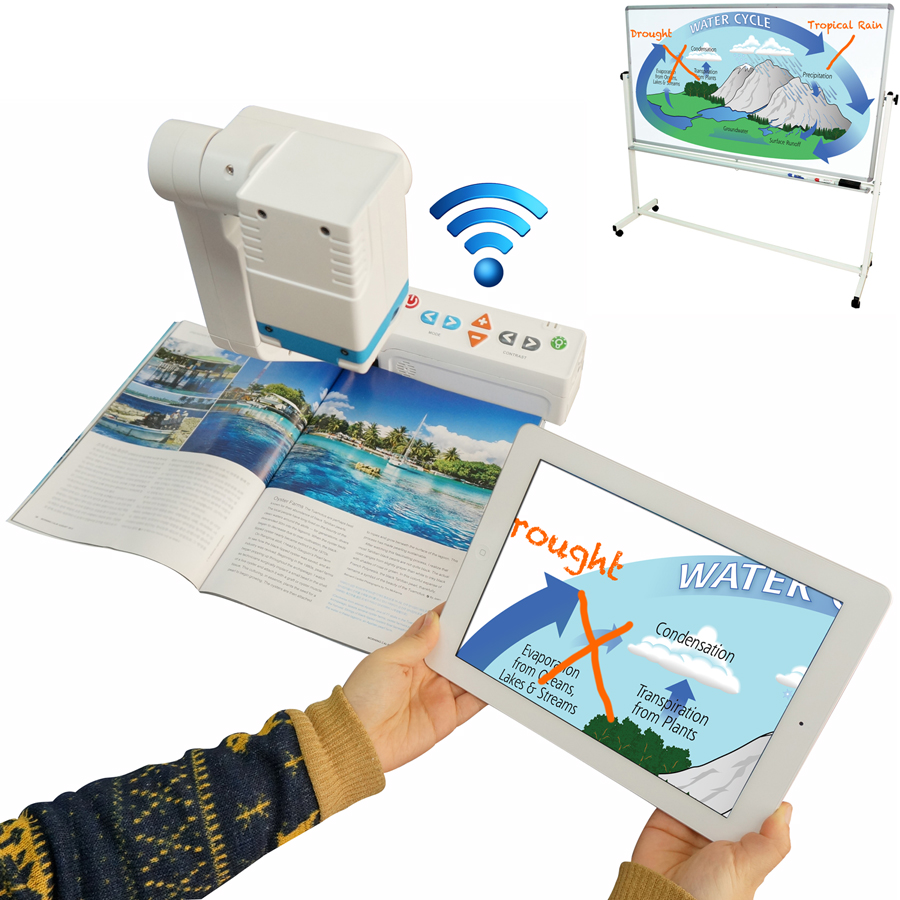
Connect E-bot to your iPad™ or Android™ tablet, Mac™ or PC to view and interact with your reading, writing or distance image. E-bot creates its own dedicated Wi-Fi hotspot that connects wirelessly to tablets. Just install the E-bot App on your tablet, then launch it for a quick and automatic connection. Use intuitive pinch and swipe gestures to change the zoom level, image mode and contrast level, as well as snapshot the OCR screen image.
Sturdy, portable, lightweight, easy-touse and packed with features!
- Convenient Portable Magnifier: Bring lightweight E-bot wherever you need it: Classroom, library, home or office.
- Exclusive iPad and Android Tablet Compatibility – Completely Wireless!
Display E-bot’s image on your iPad or Android tablet. Quickly and effortlessly connect your tablet via Wi-Fi connection, without any wires or cables! - Close-Up and Distance Viewing View a book or document on your desk or a presentation on a board or screen across the room. Switch between the two without losing focus on your reading or distance view.
- Familiar Touch-screen Gesture Control Increase or decrease the zoom level, change text and background color, adjust contrast and even begin and pause OCR text-to-speech using familiar pinch and swipe gestures. This intuitive user-interface means students can learn to use E-bot quickly and with very little instruction.
- USB 3.0 Transmit fast, high-quality images to your desktop or laptop PC or Mac.
- Auto Brightness A built-in light sensor automatically detects the light in your surroundings and adjusts for a perfectly lit reading or writing image.
- Rechargeable Battery Use E-bot more than 4 hours on a single charge.
- Remote Control (Exclusive to ADV model) All functions are available via an intuitive wireless remote control.
- Built-in OCR (Exclusive to ADV model) Use the built-in OCR to capture and read documents even without a PC or tablet attached, and listen to text read aloud using E-bot’s built-in speaker.
Specification
| Model Name | E-bot | E-bot ADV |
| Model # | EB100 | EB100A |
| Camera | HD, 60fps | |
| Video Output | Wi-Fi: iPad, Android Tablet, Windows PC USB 3.0/2.0: Windows / USB 3.0: Mac / HDMI: TV, Monitor |
|
| Viewing Modes | Near View, Distance View | |
| Magnification | 9.7” (Tablet): 0.8x ~ 35x / 17” (Laptop): 1.5x ~ 69x / 24” (Monitor): 2.2x ~ 97x | |
| Audio | Built-in voice guide, speaker, earphone jack, volume control | |
| Color Modes | 8 modes (7 user-definable from 56 possible color combinations) | |
| Features / Settings | Focus Lock, Find Reading Location, Contrast, Line Markers and Windows | |
| User Interface Options | On-board control panel, touch-screen, keyboard, mouse | Remote control, on-board control panel, touch-screen, keyboard, mouse |
| OCR | No | Yes |
| LED Light | Choose lights on or lights off, automatic brightness control | |
| Battery | Rechargeable, removable Lithium-Ion battery, 4-hour battery life |
|
| Case | Custom backpack carry case included | |
| Size | Folded: 8.5” W x 12.4” L x 3.9” H Unfolded: 8.5” W x 12.4” L x 14.5” H |
|
| Weight | 5 lbs | |
| Warranty | Two-years limited parts & labor warranty | |
E-Bot Gallery

E-bot & E-bot ADV iPad-compatible Read, Write and Distance Portable Video Magnifier with OCR

E-bot & E-bot ADV iPad-compatible Read, Write and Distance Portable Video Magnifier with OCR

E-bot & E-bot ADV iPad-compatible Read, Write and Distance Portable Video Magnifier with OCR
HIMS Product
Learn About the First and Only iPad Compatible Video Magnifier
Learn how a new iPad compatible wireless video magnifier called E-bot can help students with low vision embrace assistive technology, even if they’ve been reluctant in the past
Product Available in India
Sparsh Products
151-5, Rajpur Road, Dehradun
Uttarakhand – 248 001 | India
Phone : +91 135-2735011
fax : +91 135-2735011
Mobile : +91 9837088334
Email : sparshproducts@gmail.com, info@sparshproducts.com
Uttarakhand – 248 001 | India
Phone : +91 135-2735011
fax : +91 135-2735011
Mobile : +91 9837088334
Email : sparshproducts@gmail.com, info@sparshproducts.com
HIMS Contact Details
HIMS
174, Gajeong-ro, Yuseong-gu, Daejeon– 305-350 | Korea
Phone : +82-42-864-4460, +82-42-864-4462
Email (Sales) : sales@himsintl.com
Email (Support) : supports@himsintl.com
Email (Info) : hims@himsintl.com
Phone : +82-42-864-4460, +82-42-864-4462
Email (Sales) : sales@himsintl.com
Email (Support) : supports@himsintl.com
Email (Info) : hims@himsintl.com